
Introduction
If you’ve built your business Wix Website, you’re not alone — thousands of small businesses across the UK choose Wix because it’s quick, visual, and doesn’t require coding. But while Wix makes design easy, getting your site to rank well on Google UK searches can still feel confusing.
Table Of Content
The good news? Wix now offers some excellent built-in SEO tools — and with a few smart tweaks inspired by real UK business owners (and a few clever tricks from Reddit and YouTube pros), you can turn your site into a strong performer in local search results.
In this guide, you’ll learn step-by-step how to improve your Wix site’s SEO, speed, and mobile experience. We’ll cover everything from the basics of Wix SEO Wiz to community-tested UK-specific strategies that help your business stand out online.
Is Wix Right for Your UK Business?
Before diving into SEO optimisation, it’s important to confirm that Wix is the right platform for your business goals. Wix Website has grown into one of the UK’s top website builders, particularly among startups and small enterprises. According to Sharegempages.net, Wix leads in the UK’s e-commerce platform share for small businesses — a clear sign that it’s a trusted and practical choice.
But how does Wix really stack up against more complex systems like WordPress? Let’s take a closer look.
Ease of Use
Wix is built for simplicity. Its drag-and-drop editor allows you to move, resize, and design every element visually — no coding knowledge required.
- You can build a full site in hours, not weeks.
- The platform handles hosting, domain management, and updates automatically.
- SEO settings like meta titles, alt text, and redirects are accessible directly from the dashboard.
This simplicity makes Wix Website particularly attractive for UK entrepreneurs who prefer to spend time on their business — not on web maintenance or plugin updates.
In contrast, WordPress provides more control and flexibility, but it often requires extra plugins, developer help, and technical upkeep. For example, where Wix offers built-in features (like security or SSL certificates), WordPress users must manage those manually or through third parties.
So, if you want a website that just works and lets you focus on running your business rather than maintaining tech, Wix is a solid fit.
Cost & Plans
Wix Website offers transparent, predictable pricing that fits most small business budgets. UK plans typically range from £9 to £30 per month, depending on features such as custom domains, eCommerce tools, or marketing integrations.
Here’s a quick overview of what you get at each level:
- Basic Plan (£9–£12/month): Good for small brochure-style sites with essential SEO and mobile support.
- Unlimited/Business Plans (£18–£25/month): Add more bandwidth, analytics, and app integrations — perfect for growing businesses.
- Business VIP (£30+/month): Includes advanced marketing tools, online payments, and premium support.
By comparison, WordPress hosting and plugin fees can add up quickly — especially if you need SEO extensions, backup solutions, and premium templates.
For most small UK businesses, Wix’s fixed costs provide peace of mind and fewer surprises, making budgeting far easier.
Wix Website SEO Fundamentals
Now that you know Wix Website fits your business, let’s get into the heart of SEO. Wix offers several built-in tools to help your site rank better on Google — and with a few extra strategies, you can make sure your site is fully optimised for the UK market.
Built-in SEO Tools
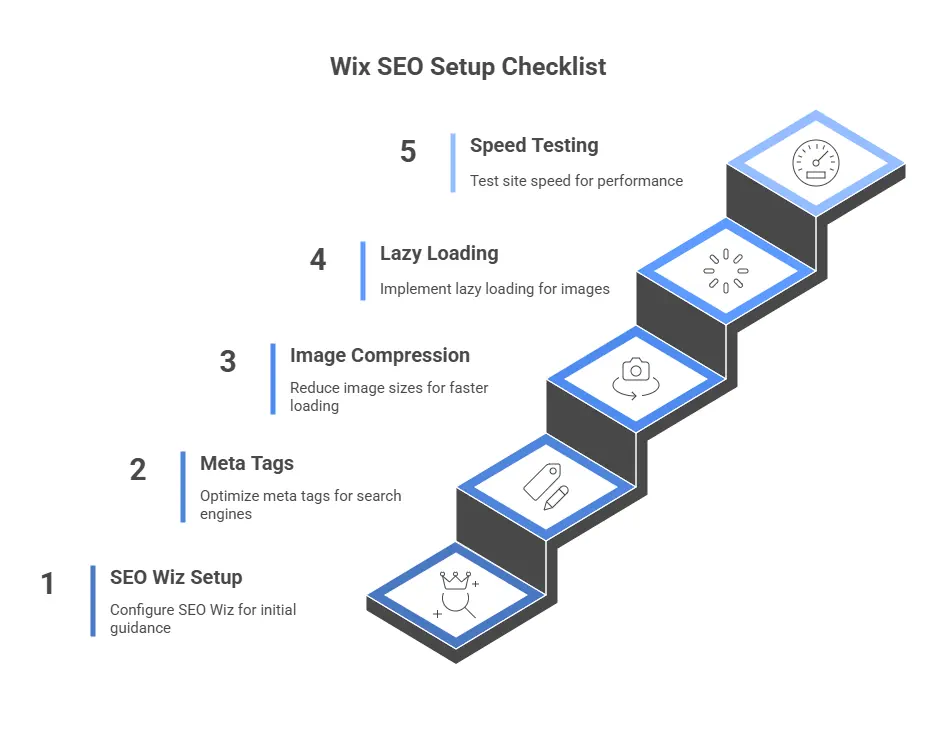
The cornerstone of Wix Website SEO system is the Wix SEO Wiz — an intelligent setup assistant that walks you through essential optimisation steps. Think of it as a digital checklist that ensures you’re covering all the basics.
Here’s what it helps you with:
- Setting up meta titles and descriptions for each page.
- Adding keywords relevant to your niche (e.g. “Wix SEO UK tips” or “London hair salon website”).
- Ensuring your site’s structure supports Google indexing.
- Integrating your site with Google Search Console and Google Analytics.
Social media users often mention that Wix SEO Wiz now includes AI-powered keyword suggestions and automatic sitemap submissions — making it far easier to stay compliant with Google’s best practices.
💡 Pro tip from Reddit: Combine Wix Website SEO Wiz with Google Analytics to monitor which keywords or landing pages perform best, then adjust your content strategy accordingly.
Template Choice and Site Speed
According to SEOMoves.co.uk, using a fast, mobile-responsive template can significantly boost your Wix site’s SEO performance. Google rewards speed, especially on mobile.
Here’s what experienced users from YouTube and Reddit recommend for site speed optimisation:
- Choose a lightweight template. Avoid overly complex designs with excessive animations.
- Compress images and videos. Use Wix’s built-in compression or external tools before uploading.
- Enable Lazy Loading — so content loads only when visible on-screen.
- Activate minified JavaScript and CSS from Site Performance Settings.
- Remove unused apps or widgets that slow down your page.
- Test regularly using Google PageSpeed Insights, Pingdom, or Wix’s own speed test tool.
Some users note that Wix’s heavy DOM structure can limit maximum speed, especially on mobile. However, keeping your layout clean, optimising media, and trimming unnecessary elements will still make a measurable difference.
Improve Your Wix Mobile Site
Google’s mobile-first indexing means your mobile version is now the version that matters most for SEO rankings. In short — if your mobile site performs poorly, your visibility in Google UK searches will too. Fortunately, Wix Website gives you dedicated mobile editing tools, so you can create a seamless user experience without touching a line of code.
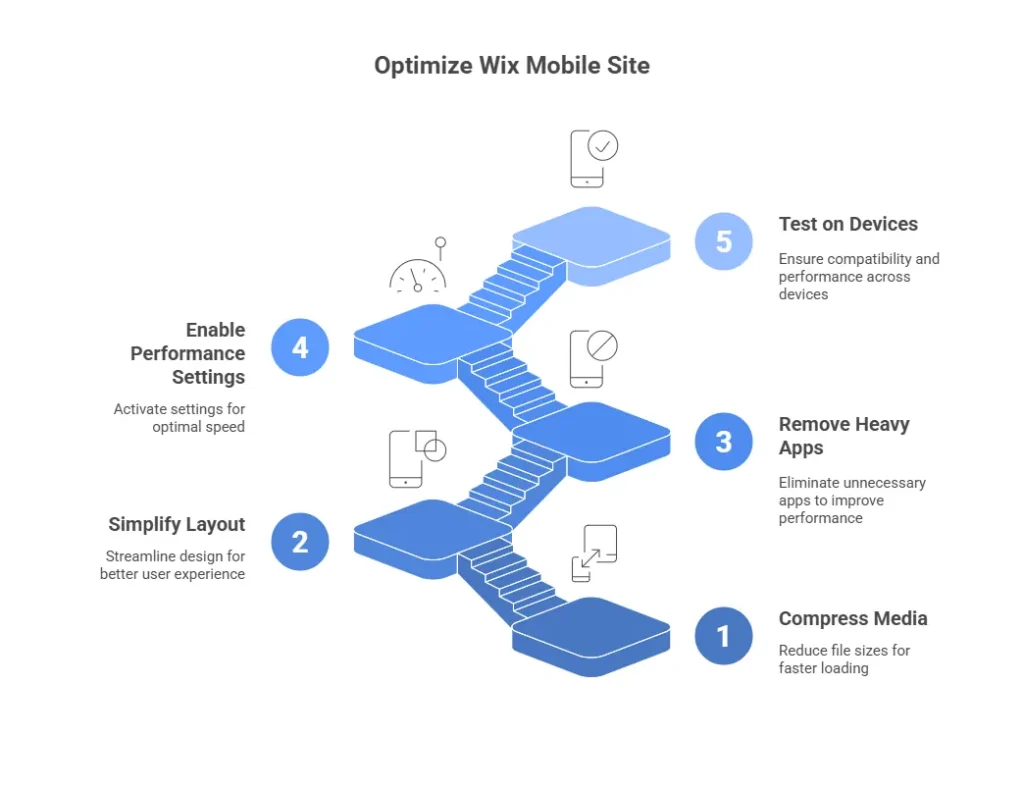
Reddit users and YouTube creators who regularly optimise Wix websites shared some of the most practical and real-world tips — especially for improving mobile load times and usability.
Here’s how you can apply them effectively:
1. Optimise Images and Media
Large image and video files are the biggest culprits behind slow mobile sites. Compress them before uploading using free tools like TinyPNG or Squoosh. In Wix Website, you can also:
- Use Wix Image Optimisation settings.
- Enable lazy loading so media loads only when a visitor scrolls to it.
- Limit background videos and animations; instead, use a static, high-quality banner.
2. Simplify Mobile Design
Wix’s Mobile Editor lets you rearrange elements separately from your desktop layout. Use this to prioritise simplicity:
- Keep text concise and readable (use at least 16px font size).
- Make buttons and links large enough for easy tapping with a thumb.
- Remove any clutter like unnecessary graphics or widgets.
- Ensure the main CTA (Call-to-Action) — such as “Book Now” or “Get a Quote” — appears at the top of the screen.
3. Remove Unused or Heavy Apps
Some Wix Website apps are fantastic for engagement, but too many can hurt your speed. Audit your apps monthly:
- Delete tools you no longer use (especially old chat widgets or pop-ups).
- Replace multiple analytics tags with a single Google Tag Manager script.
- Keep only what adds measurable value — e.g. Wix Forms, Bookings, or Stores.
4. Enable Performance Features
Wix Website provides several built-in performance options under Site Performance Settings. Ensure these are switched on:
- Minified JavaScript and CSS
- Lazy Loading for images and videos
- Optimised font delivery
These small switches can boost your PageSpeed score dramatically — often by 10–20 points on Google’s scale.
5. Test Regularly Across Devices
Don’t rely on one device. Use tools like Google PageSpeed Insights, Pingdom, or GTMetrix, and test your site on multiple screen sizes (iPhone, Android, tablets).
💡 Community Insight: Despite Wix’s heavy DOM structure, consistent maintenance — compressing files, deleting unused apps, and simplifying your layout — can achieve significant gains in both desktop and mobile performance.
Customising Your Wix Website for Conversions
Once your Wix website is optimised for SEO and speed, the next step is making sure it converts visitors into paying customers. Traffic alone doesn’t grow a business — conversion-optimised design does.
Fortunately, Wix Website offers an impressive range of built-in tools and apps to help you turn visitors into leads and sales without needing advanced technical setup.
1. Use Clear Calls-to-Action (CTAs)
A clear CTA guides users on what to do next. Place one on every key page:
- Homepage: “Book a Free Consultation”
- Service Page: “Get a Quote”
- Product Page: “Shop Now”
Avoid vague terms like “Learn More”. Be direct, benefit-focused, and repeat CTAs throughout the page.
💡 Reddit insight: Many successful UK small business owners using Wix place their CTA buttons within the top 20% of the screen (“above the fold”), ensuring visitors see them immediately on both desktop and mobile.
2. Add Trust Signals
People buy from businesses they trust. Strengthen your credibility using these elements:
- Customer reviews and testimonials (Google Reviews integration recommended).
- Trust badges and SSL certificates (already included with Wix Website).
- Real team photos or local imagery to reinforce authenticity.
If you’re targeting a specific region (like Manchester, Leeds, or Bristol), include a short local reference in your text — e.g. “Trusted by Manchester clients since 2019”. This adds a subtle local SEO benefit too.
3. Leverage Wix Apps for Engagement
Wix’s App Market offers hundreds of conversion-focused tools. A few worth using:
- Wix Forms – for lead capture.
- Wix Chat – for real-time customer engagement.
- Wix Stores – for eCommerce sales.
- Wix Bookings – for service-based businesses.
Only install what you’ll actively use — excess apps can slow performance.
4. Choose High-Conversion Templates
Certain templates are known for their layout efficiency and user flow. UK community forums frequently recommend:
- “Home Remodeling Company” – clean, modern design with built-in FAQ and service highlights.
- “3D Printing Company” – professional look with lead capture forms and contact banners.
Both are mobile-optimised and easy to brand for UK businesses.
5. Smart Internal Linking
Internal links guide visitors deeper into your website — and help search engines understand your site structure. Instead of vague phrases like “Click here”, use descriptive anchor text such as:
- “Explore our Web Design Services”
- “Learn more about Wix SEO Optimisation”
This improves navigation, keeps visitors longer on your site, and strengthens overall SEO authority.
Wix vs WordPress (Deep Dive)
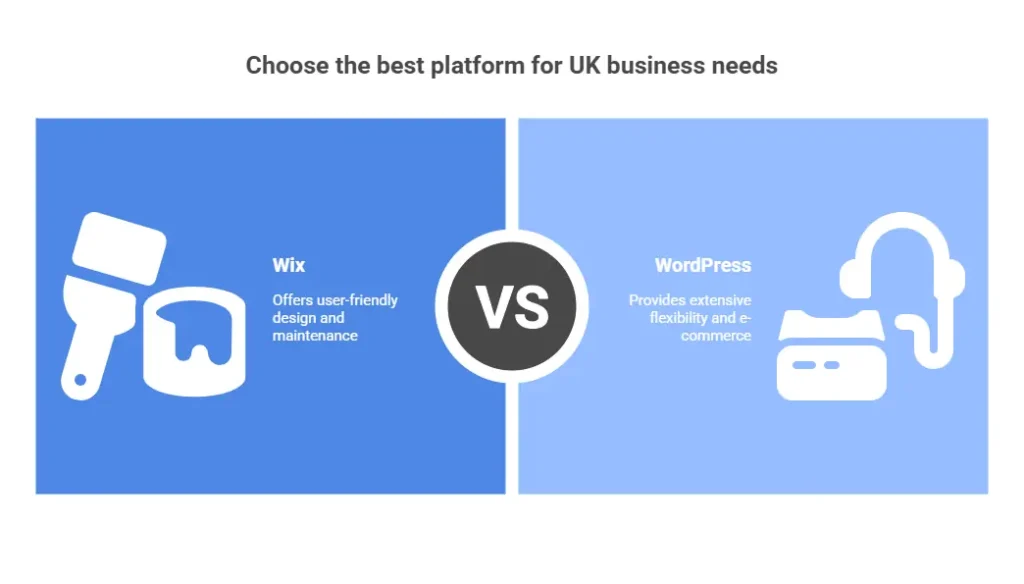
When small business owners in the UK start comparing website platforms, the Wix vs WordPress debate always comes up. Both have loyal user bases and distinct advantages, but the “best” choice depends on your business’s technical ability, design goals, and how much time you want to spend on upkeep.
Let’s break it down into clear categories based on what UK business owners care about most: usability, flexibility, e-commerce, and support.
Design Flexibility & Maintenance
Wix:
- The drag-and-drop editor gives you instant visual control — what you see is exactly what your customers will see.
- All updates, security patches, and hosting are handled automatically.
- Built-in SEO Wiz means you can adjust key elements (titles, alt text, URLs) easily without needing plugins.
WordPress:
- Offers unlimited customisation through thousands of themes and plugins.
- However, it requires more maintenance — plugins and themes need frequent updates, and security depends on your hosting setup.
- SEO flexibility is higher (e.g. with Yoast SEO or RankMath) but demands more technical confidence.
💡 Community insight: UK small business owners often mention that Wix Website provides “less flexibility but far less stress.” For busy entrepreneurs who prefer to focus on sales rather than site management, Wix’s simplicity is a major advantage.
E-commerce Capabilities
For UK businesses selling online, both Wix and WordPress offer strong e-commerce options — but their strengths differ.
Wix Stores:
- Fully integrated into the Wix Website platform — no separate installation needed.
- Supports UK payment gateways like Stripe, PayPal, and SumUp.
- Great for small to medium catalogues (up to a few hundred products).
- Includes shipping calculators, coupons, and automated email receipts.
WordPress (WooCommerce):
- Offers deeper customisation — ideal for larger shops or complex inventory systems.
- Requires separate plugin setup, hosting, and periodic updates.
- Better for businesses planning long-term scaling or custom checkout flows.
If you’re a UK business just starting with e-commerce — e.g. a boutique, local food brand, or service-based retailer — Wix Stores gives you everything you need with less setup.
Branding & Support
Wix:
- Offers 24/7 customer support via chat, email, or callback.
- Provides integrated tutorials and automatic updates.
- Custom branding (logo, colours, favicon) is managed right inside the dashboard.
WordPress:
- No official support team — users rely on community forums or hire developers.
- Custom branding options depend on your theme or external plugins.
For small UK firms without in-house tech help, Wix’s direct support can save countless hours and headaches.
Marketing & Growth on Wix
Once your Wix website is SEO-optimised and ready to convert, it’s time to bring in consistent traffic. Wix comes with a built-in marketing toolkit that’s perfect for small business growth — especially if you’re focusing on UK audiences.
1. Leverage Wix Email Marketing
Wix’s email marketing suite lets you design branded newsletters, send promotional campaigns, and automate follow-ups.
- Use it to nurture leads captured via Wix Forms or Stores.
- Segment contacts based on interest or location (e.g. London, Manchester, or Leeds).
- Track open and click-through rates to refine messaging.
💡 Pro Tip: Include a UK-focused subject line like “Exclusive Autumn Offers for Our London Customers” to boost local engagement.
2. Use Blogging for SEO & Authority
Adding a blog is one of the best ways to increase organic visibility. Wix’s blogging tool supports categories, tags, and SEO fields — everything you need to publish optimised content.
- Write posts targeting UK-specific keywords, like “Best hair salons in Birmingham” or “Eco-friendly packaging suppliers UK”.
- Link blog posts internally to your service pages for added SEO benefit.
- Use AI-generated outlines or inspiration from Wix SEO Wiz keyword suggestions to plan content faster.
3. Integrate Your Social Media
Social signals may not directly affect rankings, but they absolutely build brand awareness.
- Add your UK business’s Facebook, Instagram, and LinkedIn profiles directly to your site header or footer.
- Use Wix’s Social Bar app for elegant icon placement.
- Regularly post local updates — community events, client stories, or UK holidays (like Small Business Saturday UK).
4. Boost Local SEO
Local optimisation is essential for small UK businesses.
Follow these proven community-sourced tactics:
- Submit your site to Yelp UK, Bing Places UK, and Apple Maps.
- Get backlinks from regional blogs or news sites.
- Maintain consistent NAP (Name, Address, Phone) across every online platform.
- Encourage Google My Business reviews — and reply to each one personally.
Engaging with local audiences not only helps SEO but also builds genuine relationships with nearby customers.
Conclusion & Call to Action
Wix has evolved into a serious contender for UK small businesses looking to build professional websites without the technical hassle. With its built-in SEO tools, responsive templates, and community-tested optimisation tricks, it’s now entirely possible to rank well, load fast, and convert visitors — all within a user-friendly platform.
By focusing on three pillars — speed, mobile experience, and local SEO — your Wix website can perform exceptionally in UK search results. Regularly testing site speed, updating content, and fine-tuning design will ensure your online presence grows alongside your business.
If you’re ready to take your Wix website to the next level, consider partnering with experts who understand both SEO strategy and the UK digital landscape.
💼 Need professional Wix SEO and development support?
At DataXpie, we help small businesses across the UK optimise their Wix websites for speed, conversions, and local search visibility — ensuring you attract more leads and grow your business online.